The Real Context Window Problem: It's Not Size, It's Attention
Why your 200k context window doesn't solve the problem, and four strategies to manage attention loss in production LLM systems.
The Real Context Window Problem: It's Not Size, It's Attention
Your LLM has a 200,000 token context window. The problem isn't that it's too small—it's that attention degrades long before you hit the limit.
The Misdiagnosis
When teams see their LLM "forgetting" information mid-conversation, the instinct is to blame context window size. But the real issue is more subtle: LLMs don't attend equally to all tokens in their context.
Research on transformer attention patterns shows consistent degradation for information in the middle of context. Content at the beginning and end receives stronger attention. Pile enough tokens into the middle, and critical instructions effectively disappear.
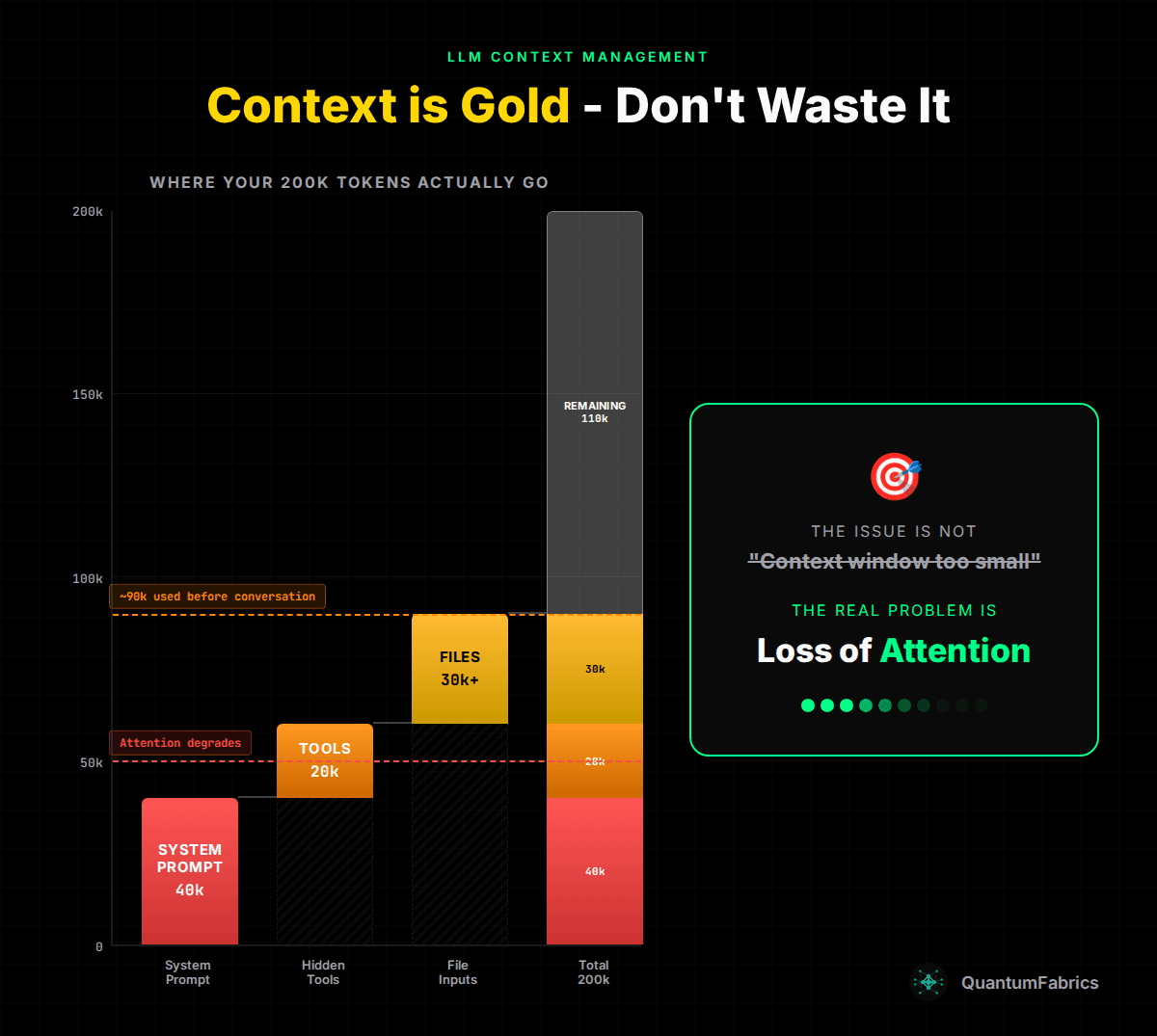
Where Your Context Actually Goes
Before users type their first message, your context is already substantially consumed:
Bloated System Prompts (~40k tokens): Instructions, safety guidelines, output formatting rules, role definitions, examples. A production agent needs comprehensive instructions, and they add up fast.
Hidden Tool Context (~20k tokens): Every tool your agent can call adds schema overhead. Tool descriptions, parameter definitions, examples—this context is added to every API call but invisible to users. Add skills, and you've got another layer of hidden consumption.
File Inputs (~30k+ tokens): The moment a user uploads a document, you're looking at significant token consumption. A 50-page PDF can easily hit 50k tokens. Two attachments, and you've consumed 100k tokens in a single message.
The math: 40k + 20k + 30k = 90k tokens before meaningful conversation begins. With a 200k window, you have 110k "remaining"—but the model's attention to your system prompt is already degrading.
The Failure Mode: Attention Loss
This isn't about running out of tokens. It's about attention distribution:
- Instructions in your system prompt get buried under tool schemas and file content
- The model "forgets" earlier attachments because attention to middle content weakens
- Tool results get returned but never referenced—the model's attention moved on
- Users repeat themselves because the model lost track of context from 10 messages ago
The symptoms look like memory problems, but they're attention problems.
Strategy 1: Token Budget Gating
Don't inject unlimited content into context. Set hard limits with graceful degradation.
// From production config
export const TOKEN_BUDGET = {
  MAX_FILE_TOKENS_PER_MESSAGE: 100_000,
  CHARS_PER_TOKEN: 4, // Conservative estimate
} as const;
The implementation:
- Calculate token estimate for each file
- Track cumulative usage across files in a message
- Files within budget: inject full content
- Files exceeding budget: inject summary + note that full content is available via read_file tool
This keeps your total context consumption predictable while maintaining access to full content when needed.
Strategy 2: Ephemeral State Storage
Store files outside the context window entirely. Inject paths, not content.
// Files stored in state.files (persisted by checkpointer)
// Not in conversation history
const filesState: InjectedFilesState = {};
for (const file of files) {
  filesState[normalizedPath] = {
    content: file.content.split("\n"),
    created_at: now,
    modified_at: now,
  };
}
The agent sees: "File available at /resume.extracted.md" Not: [50,000 tokens of resume content]
When the agent actually needs file content, it calls read_file. Most requests don't need full file content—just acknowledgment that files were received.
Strategy 3: Modular System Prompts
Stop shipping monolithic prompts. Load context dynamically based on request type.
Base prompt covers:
- Core identity and role
- Universal safety guidelines
- Output formatting basics
Skill-specific prompts load when relevant:
// Context-aware prompt building
let promptText = basePromptTemplate; // 15k tokens

if (context.requestSource === "email") {
  promptText += emailResponseInstructions; // +5k tokens
}

// Only load what's needed for this request
A 40k token monolithic prompt becomes 15k base + 5k skill-specific. You've just saved 20k tokens of attention-consuming noise.
Strategy 4: Recency Prioritization
LLMs attend better to content at the beginning and end of context. Use this to your advantage.
// Structure context with attention patterns in mind
const contextStructure = [
  systemPrompt,        // Beginning: strong attention
  ...toolSchemas,      // Middle: weaker attention (acceptable for reference)
  ...conversationHistory,
  criticalInstructions // End: strong attention - repeat key constraints
];
Key implementation details:
- Repeat critical instructions at the end of system prompts
- Place the most important user context in recent messages
- Accept that middle content will receive less attention—plan accordingly
Implementation Notes
Measuring Attention, Not Just Tokens
Token counting is necessary but insufficient. Track:
- Where in your context critical instructions appear
- How often the model fails to follow system prompt rules in long conversations
- The correlation between context length and instruction adherence
Checkpointing Strategy
Ephemeral state needs persistence across requests. LangGraph checkpointers handle this—state.files persists between conversation turns without consuming context window in each message.
Summary Generation
When files exceed token budget, generate summaries that preserve:
- Document type and structure
- Key entities mentioned
- Section headings
- Page/section count
The summary tells the model what's available. The read_file tool provides access when needed.
Practical Takeaways
-
Audit your baseline attention load. Measure system prompt + tool schemas + typical file inputs. If you're starting at 90k tokens, your instructions are already competing for attention.
-
Accept that middle content gets less attention. Design your context structure around this reality. Put critical constraints at the beginning and end.
-
Implement token budgets with fallbacks. Hard limits with graceful degradation to summaries. Don't let unlimited file inputs bury your instructions.
-
Store files in state, not context. Inject paths, read on demand. Most requests don't need full file content in the attention window.
-
Repeat critical instructions. If something must not be forgotten, state it at the beginning of your system prompt AND near the end.
Conclusion
The problem isn't context window size. 200k tokens is substantial. The problem is attention distribution—and attention degrades with context length regardless of whether you hit the token limit.
The fix isn't more tokens. It's attention management: budgets, state storage, modular loading, and strategic placement of critical information.
Manage attention, not just context.
Sources:
- LangGraph Checkpointing - State persistence patterns